

For Real Estate
WhatsApp CRM for Real Estate: Reply to Every Lead in Seconds
Answer property enquiries, share brochures and book site visits on WhatsApp from your own number or an official one, with every chat logged in Follow Up Boss, HubSpot or Zoho CRM.
Join 1000+ businesses already running WhatsApp with SyncMate
SM
Buyer lead
Website enquiry · via WhatsApp
Buyer
A. Mehta
Property
3 BHK · Whitefield
Stage
Site visit booked
Visit
Sat, 11:00
First reply
42 seconds
WhatsApp chat logged to the CRM
AM
A. Mehta
online
Hi Anil, thanks for your enquiry on the 3 BHK in Whitefield. Brochure and floor plan attached. Would Saturday at 11:00 suit a site visit?
16:20
Saturday works, see you there
16:28
Instant lead replies
Site-visit reminders
CRM sync for every chat
Your own or an official number
Definition
What Is a WhatsApp CRM for Real Estate?
A WhatsApp CRM for real estate connects your WhatsApp number to the CRM your agents already use, so every buyer and seller conversation is captured, assigned and followed up automatically. SyncMate sends replies, brochures and site-visit reminders on WhatsApp and logs each chat on the lead in Follow Up Boss, HubSpot or Zoho CRM.
Who is it for?
Real estate agents, brokerages, property developers and rental agencies.
SyncMate connects to Follow Up Boss, HubSpot and Zoho CRM directly, and to website forms and Facebook lead ads through Zapier, Make or n8n, with no code.
Use cases
How to Use WhatsApp for Real Estate Leads
Four workflows agents set up in minutes.
Leads: Instant First Reply
Message every new enquiry within seconds, before a competitor does.
Example workflow
New lead in CRM → WhatsApp intro with the listing
Viewings: Site-Visit Reminders
Remind buyers the day before so visits are not missed.
Example workflow
Visit booked → reminder 24 hours before
Nurture: Follow-up Sequences
Keep warm leads moving with timed follow-ups.
Example workflow
No reply in 3 days → follow-up with new listings
Follow Up Boss integration
Team: Shared Lead Inbox
Answer buyer and seller questions as a team from one number.
Example workflow
Buyer asks → the assigned agent replies from the shared inbox
Shared Inbox
Templates
Real Estate WhatsApp Message Templates
Copy these, add your details, and send them automatically from your CRM.
New Enquiry Reply
Send within seconds of a portal or website enquiry.
Template
Hi {name}, thanks for your interest in {property}. I’ve attached the brochure and price list. When would you like to visit?
Site-Visit Reminder
Send the day before every booked visit.
Template
Hi {name}, a reminder of your visit to {property} tomorrow at {time}. Reply 1 to confirm or 2 to reschedule.
Follow-up After a Visit
Keep the conversation going after a viewing.
Template
Hi {name}, thanks for visiting {property} today. Shall I share the payment plan or similar options nearby?
New Listing Alert
Share new properties with buyers who asked for them.
Template
Hi {name}, a new {type} in {area} just listed at {price}, matching what you asked for. Want the details?
Capabilities
Everything Real Estate Teams Can Do with SyncMate
Twelve capabilities for agents who sell on WhatsApp.
Instant Lead Replies
Send the first message seconds after an enquiry lands.
Brochures and Floor Plans
Share PDFs, photos and location pins in the chat.
Site-Visit Reminders
Remind buyers the day before, or at the time you choose.
Follow-up Sequences
Re-engage leads who go quiet, on a schedule.
CRM Logging
Keep every WhatsApp chat on the lead or deal record.
Lead Assignment
Route chats to the right agent and avoid double replies.
Shared Team Inbox
Work every enquiry from one number as a team.
AI Assistant
Answer price, location and availability questions from your documents.
Listing Groups
Post new listings to the WhatsApp groups you run.
Personalised Messages
Use the buyer’s name, property and visit time in every message.
Scheduled Sends
Hold a message for the right day and time.
Official Number Option
Connect a verified WhatsApp Business API number for campaigns.
Site-Visit Reminders That Get Read
A WhatsApp reminder the day before gets read, and buyers can reply to confirm or reschedule.
Confirm: every visit, the moment it is booked
Remind: the day before, or when you choose
Reschedule: replies come back to the assigned agent
SM
Lead timeline
Live
Enquiry received
Website form · Fri 18:02
First reply sent
SyncMate · Fri 18:02
Site visit booked
Agent · Fri 18:30
Reminder confirmed
WhatsApp · Sat 09:10
One WhatsApp Number for the Whole Sales Team
Buyer and seller messages come into a shared inbox every agent can work from.
Claim a lead so two agents never reply to the same buyer
Leave internal notes on budget and preferences
Send an away message outside office hours
Works with
Works With Your Real Estate CRM
Log chats and trigger messages from the CRM your team already uses.
Follow Up Boss
Reply to portal leads in seconds from action plans.
What you can do
Speed to lead · Action plans
Follow Up Boss integration
HubSpot
Log WhatsApp chats and create deals from conversations.
What you can do
Chat logging · Deals
HubSpot integration
Zoho CRM
Send messages from workflow rules on leads and deals.
What you can do
Workflow rules · Logging
Zoho CRM integration
Zapier
Connect website forms and lead ads to WhatsApp.
What you can do
Lead capture · Any app
Zapier integration
Setup
How to Set Up a WhatsApp CRM for Real Estate
Five steps, under ten minutes, no code at any point.
1
Step 1 — Create Your SyncMate Account
Sign up at app.assistro.co. With Follow Up Boss or Zapier, the free plan includes 450 messages a month, so you can test the whole workflow before paying.
2
Step 2 — Link Your WhatsApp Number
Scan a QR code to connect your personal or WhatsApp Business number, or connect the official Meta Business API if you need the verified badge. No BSP required either way.
3
Step 3 — Connect Your CRM or Lead Source
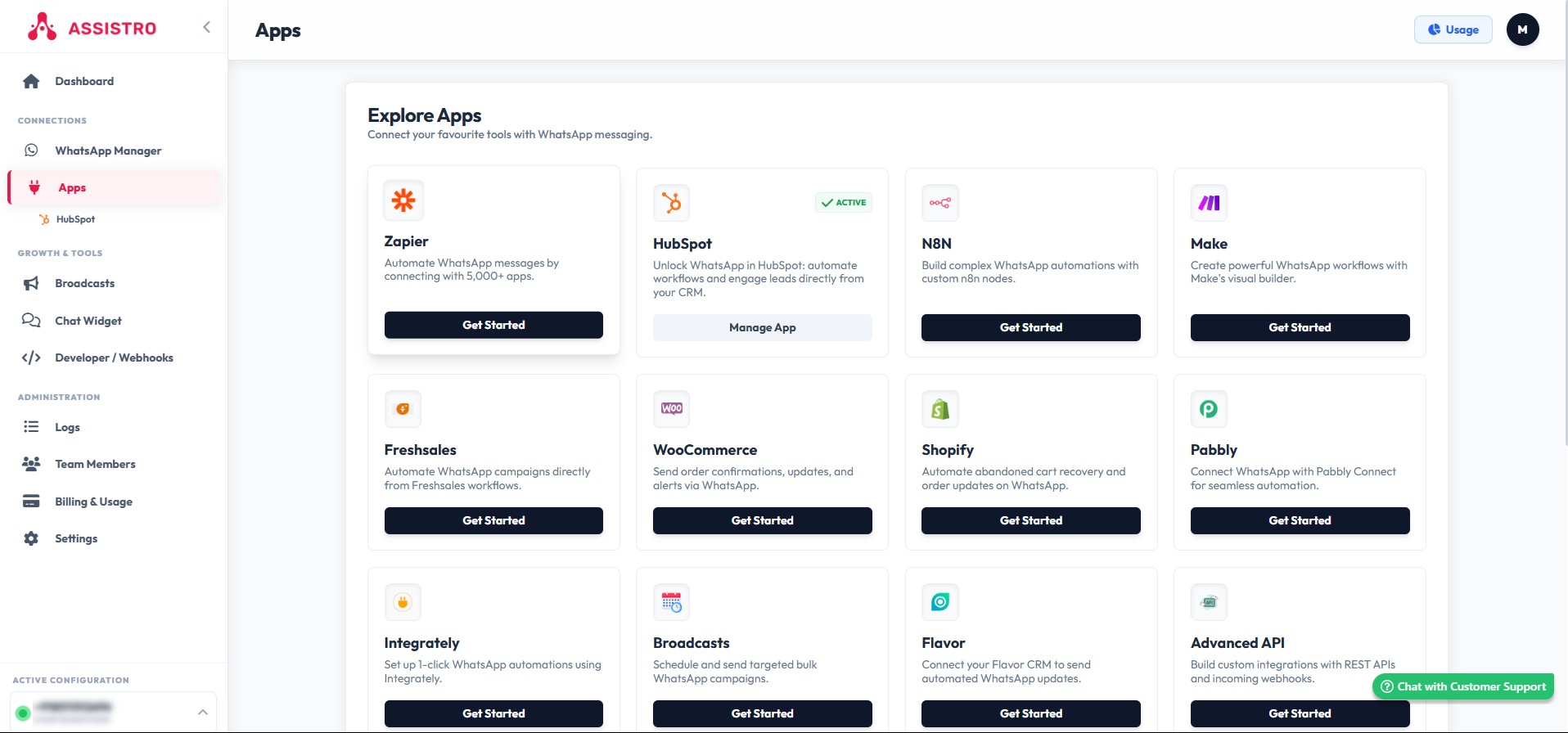
Connect Follow Up Boss, HubSpot or Zoho CRM, or bring in website forms and lead ads through Zapier, Make or n8n.
4
Step 4 — Set Up Your First Reply and Reminder
Pick the trigger, such as a new lead or a booked visit, and map the buyer’s name, property and visit time into your message templates.
5
Step 5 — Test and Go Live
Run a test send, check it arrives on the right number, then switch the automation on. Every send is logged, so a failure surfaces instead of disappearing.
Need step-by-step help? Browse the SyncMate user guide.
Watch & learn
Watch: WhatsApp Lead Follow-up for Real Estate
A quick tour of SyncMate with Follow Up Boss, plus step-by-step guides to connect WhatsApp to your real estate CRM.
Related articles

3 Ways to Connect Your WhatsApp
Choose the connection method that fits — from a two-minute browser setup to the official enterprise API.
Web WhatsApp
Connect through WhatsApp Web — the fastest way to start. Scan a QR code in your browser and automate.
Instant setup — under 2 minutes
Works with personal WhatsApp
No API approval needed
Requires your machine and browser to stay on
Assistro Standard
Scan a QR code once and Assistro's cloud relay keeps your WhatsApp connected 24/7 — no machine needed.
No machine-on limitation
Cloud-based 24/7 relay
Works with personal WhatsApp
No API approval needed
Always connected — no machine required
Meta Business Number
Use the official WhatsApp Business API via Meta for enterprise messaging with a verified business identity.
Official Meta verification
Green badge verified business
Higher messaging limits
The most reliable way to send at scale
FAQs
WhatsApp CRM for Real Estate FAQs
What is the best WhatsApp CRM for real estate?
The best choice connects WhatsApp to the CRM you already use instead of replacing it. SyncMate adds WhatsApp to Follow Up Boss, HubSpot and Zoho CRM, logs every chat on the lead, and works with your own number or an official WhatsApp Business API number.
Is there a free WhatsApp CRM for real estate?
Yes, with Follow Up Boss or Zapier: SyncMate’s free plan includes 450 messages a month, so you can test lead replies and reminders before paying. Zoho CRM and HubSpot connections are on paid plans.
Can I use a WhatsApp chatbot for real estate?
Yes. SyncMate’s AI assistant answers common questions on price, location and availability from your documents, and hands the chat to an agent when the buyer is ready.
How do I use WhatsApp for real estate leads?
Reply to each new enquiry within seconds, share the brochure and floor plan, book a site visit and send a reminder the day before. SyncMate automates each step from your CRM.
Can several agents share one WhatsApp number?
Yes. The shared inbox lets agents claim leads, leave notes and reply from one number, so two people never answer the same buyer.
Do I need the WhatsApp Business API?
No. SyncMate works with your own WhatsApp or WhatsApp Business number, with no BSP approval. For large campaigns or a verified badge, you can connect an official WhatsApp Business API number to the same account.
Will my WhatsApp number get banned?
Message people who expect to hear from you, keep volumes sensible and space out bulk sends. Following those habits keeps your number in good standing.
Can I send property brochures and site-visit reminders on WhatsApp?
Yes. Send PDFs, photos and location pins in the chat, and schedule a reminder before every visit so buyers can confirm or reschedule.
How much does a WhatsApp CRM for real estate cost?
It depends on the CRM you connect. With Follow Up Boss or Zapier, SyncMate is free for 450 messages a month, with paid plans from $5/month. Zoho CRM plans start at $5/month and HubSpot plans at $32/month.
Can leads from my website or Facebook ads go straight to WhatsApp?
Yes. Connect the form or lead ad to SyncMate through Zapier, Make or n8n, and the buyer gets a WhatsApp reply within seconds. You can add the lead to your CRM in the same workflow.
Can I post new listings to WhatsApp groups?
Yes, from your own number. SyncMate can post to any WhatsApp group your number is in, such as a buyers’ group you run. Only post where members asked for updates.
Can I use an official WhatsApp number for project launches?
Yes. Connect an official WhatsApp Business API number to the same account to send approved templates to large opted-in lists, while agents keep chatting from their own numbers.
Ready to Answer Every Lead First?
Connect your CRM in minutes. No coding, and no BSP approval on the personal-number route.