


Quick answer: A WhatsApp group ID is usually a long number ending in @g.us, and the WhatsApp app never shows it. To get it, install the free SyncMate Chrome extension, open the group in WhatsApp Web and click Copy on the Group ID badge. Then paste the ID into Zapier, Make or n8n.
Using the ID in an automation? See the apps SyncMate connects WhatsApp to.
Sources checked on 9 November 2026. Spotted an error? Report a correction. Read about Assistro. Looking for groups to join instead? See how to find WhatsApp groups.
Key Takeaways
- Every WhatsApp group has its own ID ending in @g.us. Automation tools need it to know which group to message.
- WhatsApp doesn't display it on your phone or in WhatsApp Web.
- The SyncMate extension shows it in a badge when you open the group in WhatsApp Web, with a one-click Copy button.
- Groups created through Meta's official Cloud API use a different kind of ID, so the @g.us ID won't work there.
In this guide: What the ID is · Get it in 5 steps · Badge not showing · ID formats · Cloud API groups · Without the extension · Using the ID · FAQ · Automate your group
What a WhatsApp group ID actually is
A WhatsApp group ID is a unique string that belongs to one group, and it always ends in @g.us. Zapier, Make, n8n and own-number WhatsApp libraries all use it as the group's address, because a group has no phone number to send to.
It isn't the group's name, which anyone with permission can change, and it isn't the invite link, which an admin can reset. In our experience running group automations at SyncMate, renaming a group or changing its members doesn't change its ID.
The fastest way: SyncMate's Chrome extension
Install the free SyncMate extension, open the group in WhatsApp Web, and a badge in the bottom-right corner shows the group's ID. Click Copy and you have it. No settings to dig through and no code.
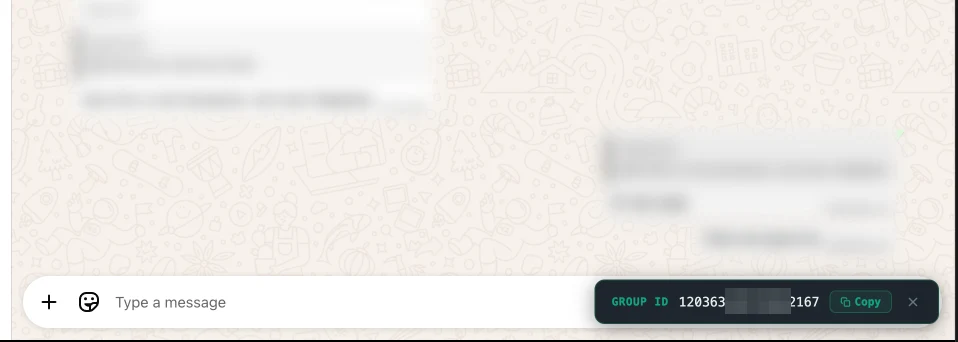
The Group ID badge in WhatsApp Web. We've hidden some digits of our team group's ID.
Step 1: Install the extension
Add SyncMate from the Chrome Web Store, where it's listed as a WhatsApp CRM and shared inbox extension. It's free to install. Chromium browsers that accept Chrome Web Store extensions, such as Edge and Brave, can add it too.
Step 2: Open WhatsApp Web
Go to web.whatsapp.com on your computer. If you aren't logged in, scan the QR code with your phone.
Step 3: Open the group chat
Click the group you need the ID for and let it load. You need to be a member of the group.
Step 4: Look for the badge
A dark badge labelled GROUP ID appears in the bottom-right of the screen. It closes by itself after about 5 seconds, or you can close it with ✕. Reopen the group to bring it back.
Step 5: Copy the ID
Click Copy. The badge shows only the number, and the copied value adds the @g.us ending, such as 120363012345678901@g.us. Paste that full value into your automation tool.
Badge not showing?
Try these checks in order:
- Reload WhatsApp Web. Refresh the tab after installing, so the extension loads.
- Check the extension is on. Open your browser's extensions page and make sure SyncMate is enabled.
- Open a group, not a person. The badge only appears in group chats, because a one-to-one chat has no group ID.
WhatsApp ID formats at a glance
The @g.us ending is how you know you have a group ID. WhatsApp uses a different ending for each kind of chat, so check the ending first when an automation fails.
Newer groups use one long number. Groups created before November 2021 can have two numbers joined by a hyphen, such as 14155550123-1580000000@g.us: the creator's phone number, then a timestamp. That's according to Z-API's group documentation, which notes WhatsApp changed the format for new groups on 4 November 2021. Copy the ID exactly as shown, hyphen included.
What you're messaging
ID ends in
Example shape
A group
@g.us
120363012345678901@g.us
A group created before November 2021
@g.us
14155550123-1580000000@g.us
A person (phone number)
@s.whatsapp.net (older tools use @c.us)
14155550123@s.whatsapp.net
A channel
@newsletter
120363012345678901@newsletter
A person behind a privacy ID
@lid
A number that isn't their phone number
These endings are WhatsApp's internal address types, as listed in the open-source whatsmeow library's documentation. WhatsApp doesn't publish them for the regular app, so tools may show them slightly differently. For channels, see our WhatsApp channel ID guide.
Official Cloud API groups use a different ID
If you use Meta's official WhatsApp Cloud API, an @g.us ID won't work there. Cloud API groups are created through Meta's Groups API. Each one gets its own group_id, a long code without an @ ending, which appears in the API responses and webhooks.
Those groups work differently from the groups on your phone. Meta lists a maximum of 8 participants, and people join through an invite link rather than being added. The @g.us ID in this guide is for the other route: automating groups on your own WhatsApp number.
Don't want to install an extension?
The main alternative is for developers. If you already run a WhatsApp library or API connected to your number, its group list responses include each group's @g.us ID. That means writing or running code just to read one ID, so for most people the extension is the quicker choice.
What to do with your group ID
The ID tells your automation which group to post into. Here's where it goes in each tool:
- Zapier: choose the "Send WhatsApp Group Message via SyncMate" action and paste the ID into the group field. See the Zapier group message guide.
- Make: paste it where the SyncMate module asks for the group. See connecting Make to SyncMate.
- n8n: use it as the group you're sending to. See sending WhatsApp messages from n8n.
- Your own code: use it as the recipient in a send-message request to SyncMate's API.
Teams use this to post new orders to an internal sales group, send a daily report to a team chat, or update a client group when a project's status changes.
Frequently asked questions
What is a WhatsApp group ID and why do I need one?
It's a unique string ending in @g.us that belongs to one WhatsApp group. Automation tools like Zapier, Make and n8n need it to know which group to message, and WhatsApp doesn't show it in the app.
Is my group ID the same as my group's invite link?
No. An invite link lets people join the group, and an admin can reset it at any time. The group ID is a separate identifier used only for automation, and resetting the invite link doesn't change it.
Does the group ID change if I rename the group or add new members?
No. In our experience, changing the name, icon or members leaves the ID the same. A new group always gets a new ID, so if a group is deleted and recreated, update your automations.
Can I find a WhatsApp group ID on my phone?
Not in the WhatsApp phone app. It doesn't show group IDs anywhere. Use WhatsApp Web on a computer with the extension, then copy the ID from there.
Can I find my group ID without installing anything?
Usually only with code. Developers can read group IDs from the group list in a WhatsApp library or API they already run. For everyone else, the extension is quicker.
What's the difference between a group ID and a channel ID?
A group ID ends in @g.us and a channel ID ends in @newsletter. They aren't interchangeable, so an automation set up for one will fail with the other. Our channel ID guide covers channels.
Is it safe to share my group ID with a third-party tool?
A group ID on its own doesn't give access to the group or its messages. A tool can only use it through a WhatsApp account that's connected to it. Older group IDs can include the creator's phone number, though, so treat them like contact details and only paste them into tools you trust.
Does this work with WhatsApp Business, or only regular WhatsApp?
Both. The steps are the same whether the group is on a regular WhatsApp account or a WhatsApp Business app account.
Send messages to your group automatically
Once you have the ID, your other apps can post to the group. SyncMate connects WhatsApp to Zapier, Make and n8n, so a new order, form entry or spreadsheet row can send a message for you. The free plan includes 450 messages a month on your own number. That route isn't the official WhatsApp API, so read about ban risk first.
Create a free SyncMate accountAbout the author: Herat Shah is Full-stack Lead at Assistro, building the systems behind SyncMate's WhatsApp connections and integrations, and writes about how WhatsApp automation works under the hood. See Herat Shah's author profile.